The student platform for Montessori schools
Their work. Their plan. Their record.
Waypoint is the student platform built for Montessori schools, starting with adolescent programs. The student builds the plan, keeps the record, and assesses the work. The guide observes, confers, and countersigns.
One student. One working week.
Follow the work.
Meet the thinking.
A bakery crew, a pricing question, and a record worth keeping. Walk through Nadia’s week in the Waypoint demo.
Fictional student and school. Names, figures, and excerpts come from the public demonstration.
The plan
A commitment with real consequences.
Thursday register
In progress · Bring both pricing options to the crew.
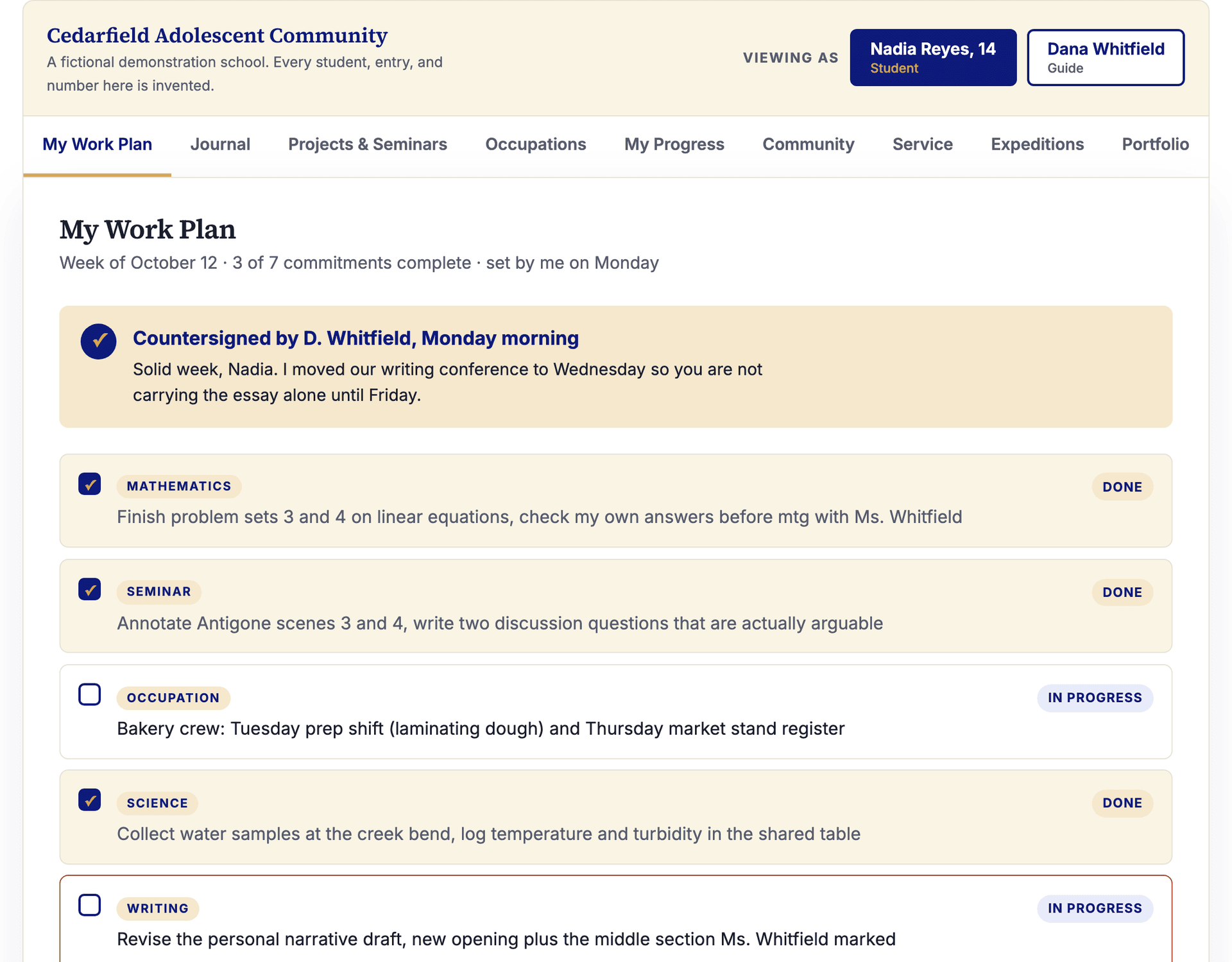
Nadia has Tuesday prep and Thursday register. Her occupation sits beside seminar, independent work, and other commitments in the same weekly plan.
Open the plan in the working demo →Explore the work
The problem
Your program runs on ownership. Your software runs on compliance.
Montessori adolescent programs run on real work: self-directed study, occupations, micro-economy businesses, seminars, community responsibility. And most of them manage that work in Google Classroom.
Google Classroom is honest software. It was built for a different model of school, and it does that job well: the teacher assigns, the student submits, the teacher grades. But run an adolescent community on it and the tool contradicts the guide every day. You own this work, says the adult. Await your next assignment, says the screen. Compliance architecture cannot carry a pedagogy built on ownership.
The assignment pipe
- The adult assigns. The student complies.
- The record belongs to the teacher.
- Grades close every loop.
- Work exists because it was assigned.
Waypoint
- The student sets the plan. The guide countersigns.
- The record belongs to the student.
- Self-assessment against a progression. No grades in the daily work.
- Work exists because the student committed to it.
A waypoint is a reference point a traveler sets for themselves along a route. That is what this tool holds: the student's own fixed points, not the adult's assignments.
The product
Everything an adolescent program actually runs on
Waypoint is not five screens. It holds the program: the daily work, the community that governs itself, the service and the expeditions, and the records the outside world asks for. The week is the unit of work. The cycle is the unit of a program.
Start with the five daily surfaces. These are the ones in the demo, seeded with a fictional school. Click through it yourself. It takes two minutes to feel the difference.
01
Work Plan
The student sets the week. The guide countersigns it.
Goals, commitments, occupation shifts, seminar prep: the student writes the plan on Monday and answers to it all week. A stuck student flags the item instead of hiding it. The countersignature means the guide has seen the plan and stands behind it, not that the guide wrote it.
02
Journal
A working record with real reflection, not busywork.
Adolescents will write honestly about their work when the writing belongs to them. The student decides what the guide sees. Shared entries become conferral threads. Private entries stay private, and no adult platform ever reads them.
03
Projects & Seminars
Preparation, sources, roles, readiness.
A seminar works when everyone arrives prepared, and readiness should be visible before anyone walks in. Roles rotate, questions are drafted in advance, and a project board holds the long work: the hypothesis log, the sampling schedule, the thing the team owes each other by Friday.
04
Occupations
Real responsibilities and real numbers.
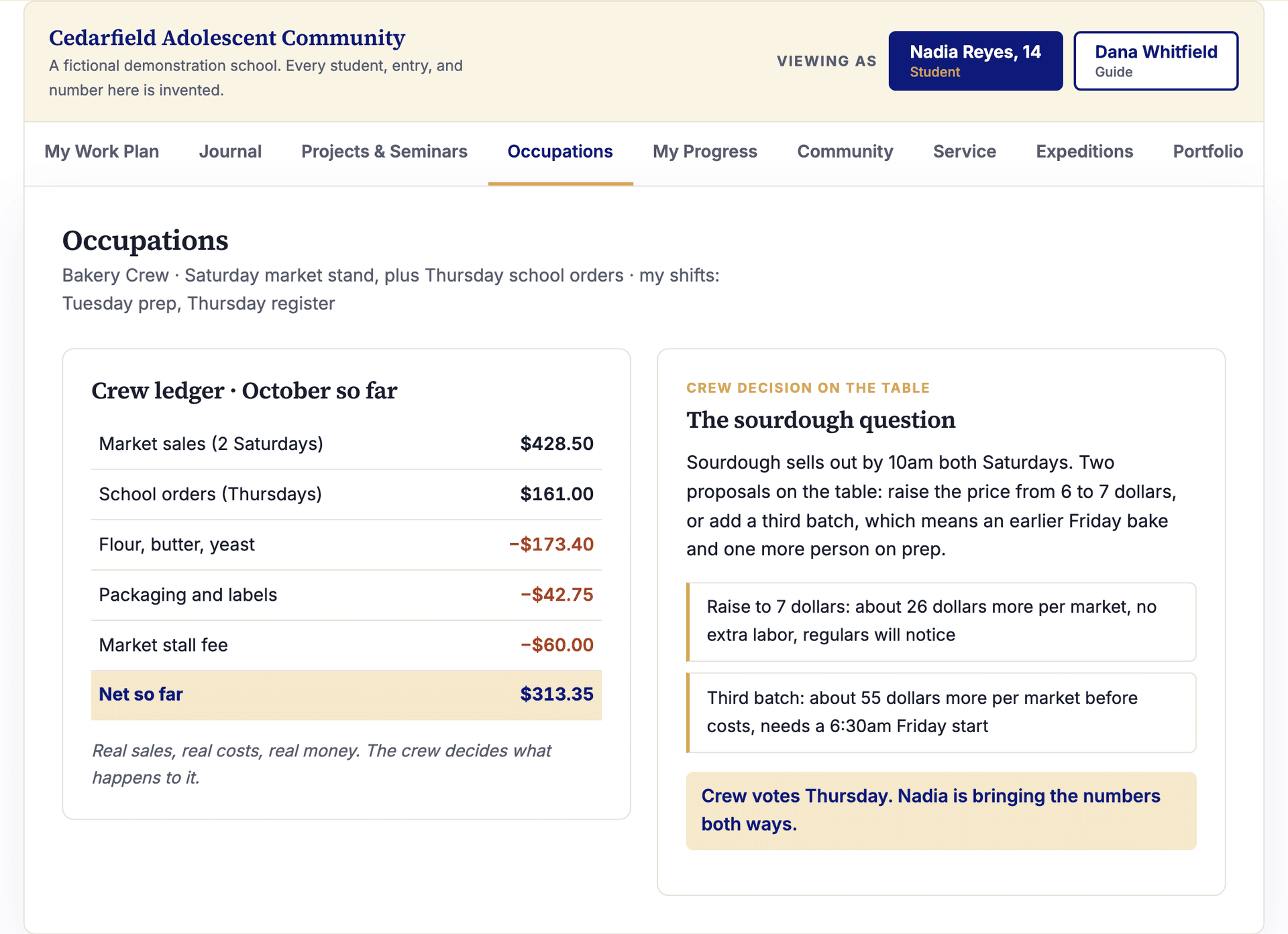
The micro-economy is not a simulation, so the software cannot be one either. Shifts, a ledger with actual dollars, and the decisions a crew has to make when the sourdough sells out by ten: raise the price or bake a third batch. The numbers are the curriculum.
05
Progress
Self-assessment against a Montessori progression. No grades in the daily work.
The student marks where they are in each domain, attaches evidence, and declares when something is ready to show. The guide countersigns the claim or confers about the gap. There is no gradebook in the daily work and no percentage hiding behind a setting. For programs that owe the outside world grades, public programs especially, Waypoint translates evidence into required reports: the grade is an export, not the environment.
The rest of the program
The parts no assignment tool has ever held
Field research with adolescent programs kept surfacing the same three things, and no software held any of them: the community meeting, the service requirement, and the trip the students planned themselves. All three are built. They are not on a roadmap and they are not modules you buy later.
Community life
- A meeting the cohort convenes, facilitates, and minutes itself. Adults can read it and cannot edit it.
- Committees with real purposes, rosters, and terms, so leadership rotates and is visible.
- A private way to ask for a mediated conversation, routed to the guide and never to peers.
Service, expeditions, portfolios
- A service log the guide verifies, counted plainly against a program's requirement. No meters, no badges.
- Expeditions the students plan: purpose, itinerary, crew roles, a real budget, and the guide's countersignature before anyone leaves.
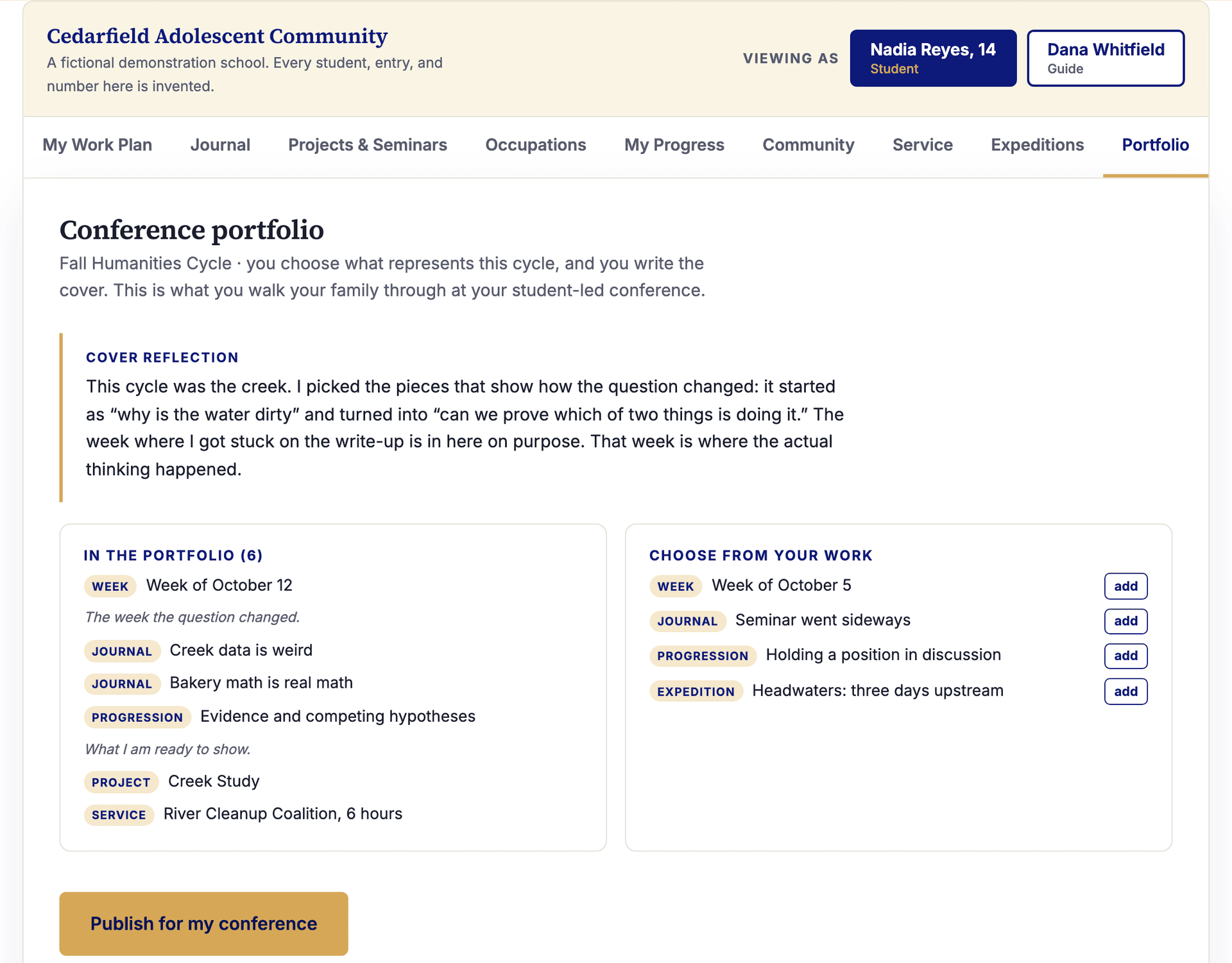
- Conference portfolios the student curates and writes a cover for, published as a snapshot for their student-led conference.
Cycles hold it together: humanities cycles, trimesters, elective sessions, intersessions. The week stays the unit of work. The cycle is the unit of a program.
Records
What the outside world asks for, without changing what happens inside
Public programs owe transcripts. Charter authorizers owe reports. Families ask for something they can hold, and fifteen-year-olds eventually need something a college will read. None of that has to reach into the daily work, and in Waypoint it does not.
If your program owes grades
- A guide translates evidence into marks at the end of a cycle. Nothing is ever calculated from activity.
- Every mark links to what it stands for: countersigned weeks, progression, completed projects.
- Reports publish as documents the student can always see, print as report cards, and export for your SIS.
- Credits, course codes, and a formal transcript for programs serving 15 to 18.
If it does not
- A mastery record assembles the same evidence into a document a college can read, without inventing a grade to fill a box.
- Progression, portfolios, capstone, internship hours, and verified service, in one export.
- Conference portfolios the student curated, kept as published snapshots.
- Selected records can be shared with MMAP after school-specific setup and verification. Journals never cross.
The grade is an export, not the environment. Turn the reporting layer off and no grading surface exists anywhere in the product.
Built in plane order
The interface expands as the child does
Waypoint's deepest design rule comes straight from the four planes: freedom within structure, expanding with development, expressed in software. Not a maximum-engagement design at any age.
Now
Adolescent programs, 12 to 18
The full workspace: work plans, journal, seminars, occupations, self-assessment, community life, service, and expeditions. Student-owned, guide-countersigned. The founding cohort is focused on 12 to 15.
15 to 18 packCapstones with external mentors, internships with verified hours, credits toward graduation, and mastery transcripts. Built into the architecture.
Next
Upper Elementary
At the second plane's end: a work plan, a journal, and the tools for going out and student-led conferences, guide-mediated. The child's first waypoints, set with an adult beside them.
Never
Before the second plane
Deliberately not child-facing. The younger child's record can live in the system, but the interface at that age belongs to the guide. That is what MMAP and MMAS already are. By design, not by omission.
A record that begins with the guide at six becomes a workspace the student owns at sixteen.
The guide's side
Observation first. Nothing to grade, everything to see.
The guide's view is not a control panel. It is a prepared environment for observation and conferral: who has shared, who has flagged, whose plan is waiting for a signature, whose silence has gone on a week too long.
- A conferral feed Journal shares, flagged commitments, and progress claims arrive as invitations to confer, not items to score.
- A countersign queuePlans and readiness claims wait for the guide's signature. Signing means: I have seen this, and I stand behind it.
- Synced to MMAP Progress summaries and records flow to the adult platform, so school records live where school records live. Students never touch MMAP, and what a student marks private never leaves their journal.
Privacy as design
A work tool, not a surveillance tool
Software for adolescents earns trust by its architecture, not its policy page. Here is the stance, plainly:
- A separate platform from MMAP, with separate student accounts. Students never touch the adult system.
- Built for FERPA and COPPA compliance through school agreements. The school is the client. The family signs nothing with us.
- No ads. Ever. There is no version of this where ads appear.
- No social feed. No likes, no followers, no streaks.
- No peer-to-peer messaging.
- No data sold, no data mined, no engagement metrics on children.
- School-provisioned accounts. No personal email required from any student.
- The work belongs to the student and the school. When a school leaves, the records leave with them.
- Students can always see exactly what adults can see: every student has a Visibility screen generated from the platform's own access rules. And every cohort writes its own agreements for the digital space it shares.
The journal a fourteen-year-old keeps about her own work is hers. Building software that honors that sentence is the whole job.
Design partners
We are building Waypoint with three to five adolescent programs
Not beta testers. Design partners. Programs whose guides and students will shape what gets built, in exchange for terms that honor the risk of going first.
We will walk through the working platform and confirm which workflows and connections are ready for your program.

A clear starting point
Standalone: $1,200 per program per year. With an active MMAP subscription: $900 per year, or $75 per month with a 12-month agreement.
Start with a 30-day design-partner pilot for one agreed program. We confirm the start date in writing. Continuing on a paid plan is your choice; there is no automatic conversion.
See pricing and program details →Direct input on the build
A standing line to the people writing the software. What your guides need shapes what ships next.
Named as a founding school
With your permission, your program is named as a founding school of Waypoint. Your practice, credited. Naming is optional and always yours to decline.
What we ask in return
- Monthly feedback. A standing conversation with your guides about what is working and what is not.
- Real usage. Students and guides in the platform doing the actual work of your program during the pilot.
- Naming, only if you want it. We name your school as a founding school with your permission and not otherwise.
Questions
Asked and answered
How does Waypoint relate to MMAP?
Waypoint is a separate platform in the Montessori Makers Group family, and an add-on for schools that run MMAP, the Montessori Alignment Map. Record sharing requires school-specific setup and verification. Student accounts are separate, student journals stay in Waypoint, and students never touch the adult platform.
You do not need MMAP to use Waypoint. If you have it, we confirm the available record views as part of your program setup. MMAP's side of that pairing is written up at montessorimakersalignmentmap.com/waypoint.
What ages is Waypoint for?
Waypoint is built in plane order. Adolescent programs get the full workspace now, and the founding cohort is adolescent programs only. Upper elementary comes next: work plans, journals, going-out planning, and student-led conference portfolios, mediated by the guide. Before the second plane, Waypoint is deliberately not child-facing at all. The younger child's record can live in the system, but the interface at that age belongs to the guide. That is a conviction, not a gap in the roadmap.
What does it cost?
Waypoint is $1,200 per program per year on its own, or $900 per year for an active paid MMAP school. The MMAP rate can be billed at $75 per month with a 12-month agreement.
Design partners can begin with a 30-day pilot for one agreed program. We confirm the start date in writing. At the end, you explicitly choose standalone or MMAP pricing; the pilot does not automatically become a paid subscription.
We will not do the thing where the price is a sales call.
What does Waypoint replace?
The assignment pipe. Google Classroom, the LMS, the shared-drive-and-spreadsheet system holding your work plans together. It does not replace the guide, the conference, the seminar, or the community meeting. Software that tries to replace the guide has misunderstood the pedagogy at the door.
Our program is required to give grades. Can we use Waypoint?
Yes. Grades are never the pedagogy in Waypoint: the daily work stays ungraded, the self-assessment is never converted into a mark, and no average runs anywhere. But many programs, public programs especially, owe the outside world grades. For them, Waypoint has an optional reporting layer the school turns on: at the end of a reporting period the guide translates the evidence, countersigned weeks, progression, completed projects, into the marks the program requires, with every mark linked to the work it stands for. Reports publish as documents the student can always see, print as report cards, and export for transcripts. The grade is an export, not the environment.
When can we start?
The design partner cohort comes first: three to five adolescent programs building with us directly. General availability follows. If you want the earliest possible seat and a voice in what gets built, apply as a design partner. Otherwise the waitlist is the honest answer, and we will write when it is your turn.
Do students need email addresses?
No. Accounts are provisioned by the school. No personal email is required, and Waypoint never asks a student for one.